
Bracketsの拡張機能「Sudimer」を作成しました
皆様、いかがお過ごしであろうか? お久しぶりな方はお久しぶり、初めましてな方は初めまして。野地である。
一ヶ月に一回コンスタントに更新してきたこのブログも会社が凄まじく忙しくなってきたことによって半年近く止まってしまっていたが、今回は@nayucolonyさんが立ち上げた素晴らしいAdvent Calenadarに参加させて頂けることになったので再び筆を執ることができた。
皆さんは既にこれまでの記事をご覧になっただろうか?
どれもこれもスダさんへの愛とコンテンツ力が爆発している記事ばかりでこちらとしても戦々恐々、生半可な記事は書けない上に、不覚にも13日目という折り返し地点を担当してしまった。
後半もスダさんというスーパーコンテンツメーカーを扱った神記事が投稿されるだろうが、今日のところはこの記事を楽しんでいただければ幸いである。
目次・概要
皆さんはBracketsを使っているだろうか?
知っている方が殆どだろうが、BracketsとはAdobeがフリーソフトして提供しているテキストエディタだ。
自分は普段の開発においてPHPを書くことが殆どなのでPhpStormを使用しているが、静的なサイトや記事を書くときは専らBracketsで作業することが多く、思い入れも深いエディタだ。
さて、そんなBracketsだが以前の記事でも紹介した通り、実はJavascriptによって拡張機能の作成ができる。
どうせAdvent Calendarに参加するのであればその場限りではなく、末永く皆さんに愛して頂けるスダさんを提供したいので、今回はスダさんの名前を冠した、その名も「Sudimer」なる拡張機能を世界デビューさせた。
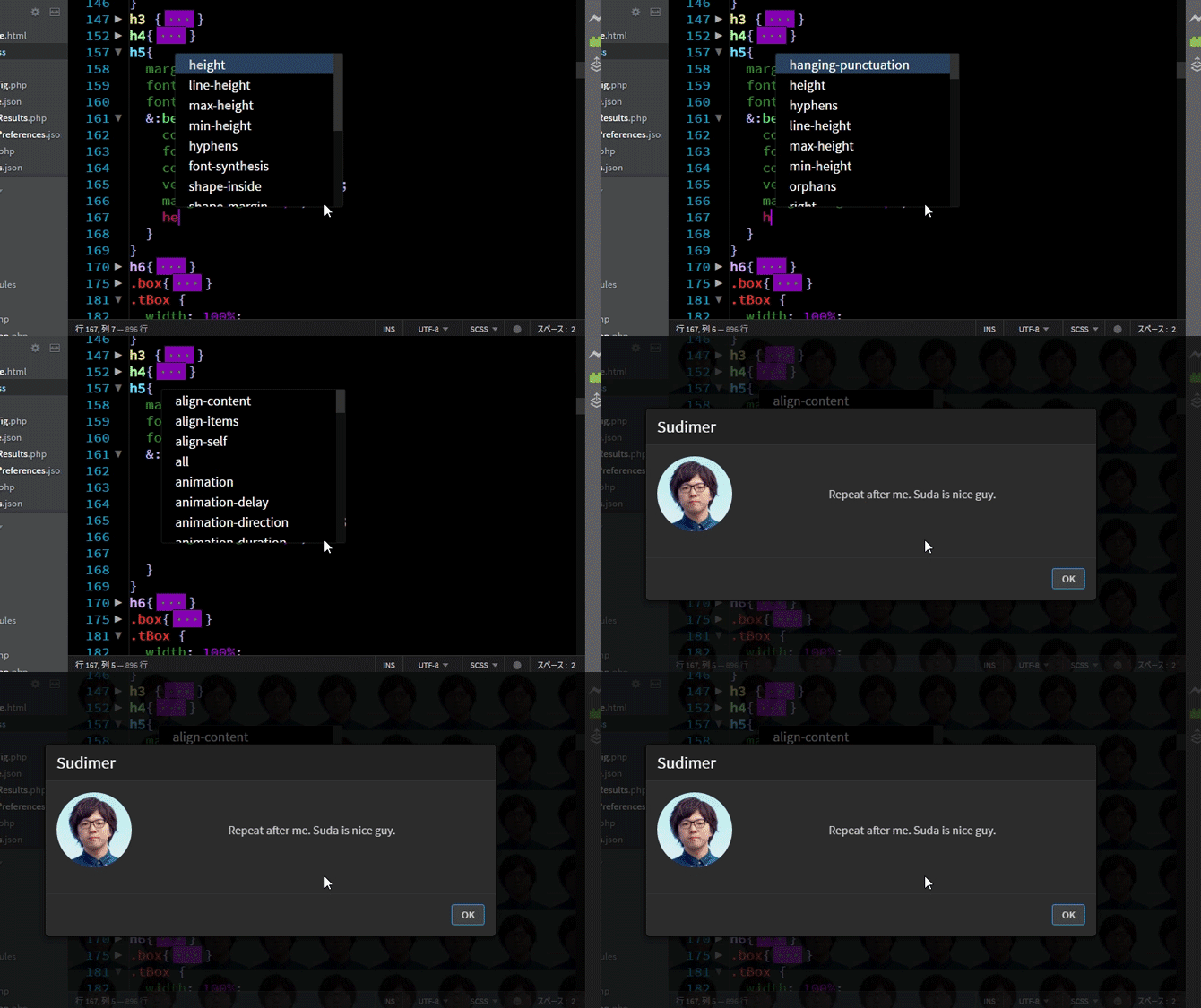
この拡張機能を使うと、自分で設定したタイミングでダイアログを出したり、Bracketsの背景を変更したり、Youtubeの動画を再生したりできる。
この記事では実際にスダさんをお借りし、使い方及び素敵なBrackets Lifeを紹介させてもらおうかと思うので、是非あなたのBracketsにもスダさんを召喚して楽しんで頂きたい。
※実際の拡張機能にはSudimerという名前以外スダさんリソースが存在しないため、以下手順に従ってSdaketsを完成させてみよう。
まずはSudimerをBracketsへインストールする
まずはBracketsの画面右にある拡張機能マネージャーを開き、「入手可能」タブで「Sudimer」と検索しよう。
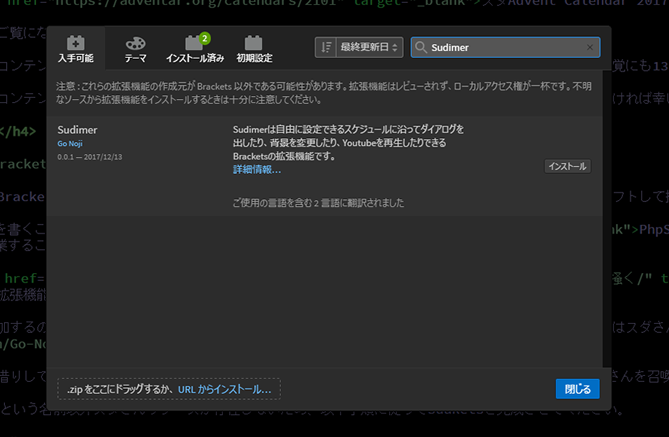
そして現れたSudimerをインストールするだけであなたのBracketsにSudimerがインストールされる。
これだけである。
スケジュール設定ファイル開く
Sudimerではスケジュールの設定をするためにschedule.jsonというファイルを編集する。
バック・フロントを問わずWeb系のエンジニアならみんな大好きjsonファイルだが、そんなもん書いたことねーよ! という方はこちらやこちらを参照して頂きたい。
schedule.jsonはどこにあるのかというと、わざわざエクスプローラーやFinderで探さずともBracketsの「ファイル」メニューの中にある「Sudimer: Open schedule.json」から開ける。
さらに別のファイルとして、同じく「ファイル」メニューの中にある「Sudimer: Open schedule-sample.json」から開けるschedule-sample.jsonはSudimerの動作に関係はないが、schedule.jsonを編集する際の参考にしたり、schedule.jsonを弄りすぎて元に戻せなくなった時用に使える(上部コメント部分までコピペするとパースエラーが発生するので注意)。
スケジュール設定をする
schedule.jsonが開けたらいよいよスケジュール設定をしていこう。
各パラメータの説明はschedule-sample.jsonにも書いてあるが、ここでも一応以下に説明しておく。
- enable: falseに設定すると動作しない。
- default: デフォルト文字列。以下の毎時や初期設定を使用する場合にここで設定した文字を使う。
- frequency: 何秒ごとにスケジュールを監視するかの設定。0.1秒以下も動作するが、Bracketsに負荷をかける場合がある。
- partner: ダイアログに出てくる人物の設定。
- image: ダイアログに設定される画像。http://, もしくはhttps://始まりでオンライン、それ以外はこのjsonファイルと同階層のimagesフォルダを参照する。
- name: ダイアログに表示される名前。
- schedules: 実行するアクションのデータ。配列で設定する。
- year, month, date, hour, minute, seconds: それぞれ年月日時分秒の設定。defaultで設定した文字を入力すると「毎○」の意味になる。なお、年は西暦、時は0~23、分秒は0~59で設定する。半角数字で入力しないとエラーになるので注意。
- message: ダイアログに表示される文章。空(””)、もしくはdefault文字に設定するとダイアログが出現しない。
- background: Bracketsのバックグラウンドに画像を差し込む設定。
- url: 差し込む画像のURL。partnerのimageと同じく、オンラインとローカル(imagesディレクトリ)を区別する。空(””)、もしくはdefault文字に設定するとbackgroundは無視される。
- size: 画像サイズの設定。いわゆるbackground-sizeの値。cover以外(containや100pxなど)は画像がリピートされる。空(””)、もしくはdefault文字に設定するとcoverが適用される。
- opacity: 透明度の設定。いわゆるopacityの値。0~1の間で設定する。空(””)、もしくはdefault文字に設定すると0.7が適用される。
- youtube: Bracketsのバックグラウンドでyoutubeを再生する設定。youtubeを視聴した際にアドレスバーに表示される”https://www.youtube.com/watch?v=「この部分」”を入力する。空(””)、もしくはdefault文字場合は無視される。
設定に不備があるとエラーダイアログが出てくるので、初期値を参考に遊んでみてほしい。
設定をスキャンして実行する
schedule.jsonの設定が済んだら内容を保存し、Bracketsの「ファイル」メニューの中にある「Sudimer: Re-scan schedule」を選択しよう。
Bracketsを再起動してもいいが、これによりSudimerがschedule.jsonの解析を行い、無事エラーが無ければ指定した時刻にアクションが作動する。
もしエラーが発生したらダイアログの内容を元にschedule.jsonを見直すか、どう見ても野地のミスだったらこっそりバグ報告をしてくれるとありがたい。
実際にスダさんで遊んでみる
一通り使い方の説明をしたところスダさんを例にSudimerの楽しみ方を紹介しよう。
まずはブラウザの開発者ツールを用いてオンラインにあるスダさんの画像URLをゲットする。
ここでは恐らくスダさんといえばコレ、といったあの写真をTwitterから拝借しよう。
これをschedule.jsonのpartner部分で、
[js]
"partner": {
"name": "スダ",
"image": "https://pbs.twimg.com/profile_images/890289317637222400/ZB6ljaQZ_400x400.jpg"
},
[/js]
schedule部分で、
[js]
{
"year": "*",
"month": "*",
"date": "*",
"hour": "2",
"minute": "0",
"seconds": "0",
"message": "こんな遅くまで仕事?<br>お疲れ様!",
"background": {
"url": "https://pbs.twimg.com/profile_images/890289317637222400/ZB6ljaQZ_400x400.jpg",
"size": "100px",
"opacity": "0.2"
},
"youtube": "*"
}
[/js]
というふうに設定してあげれば、

こんな感じで毎日夜の2時ジャストにスダさんがあなたをはげましてくれる。
背景が不気味だし、多分実際のスダさんはこんなこと言わなそうなのだが、野地のセンスの問題なのでスダさんは一切悪くない。
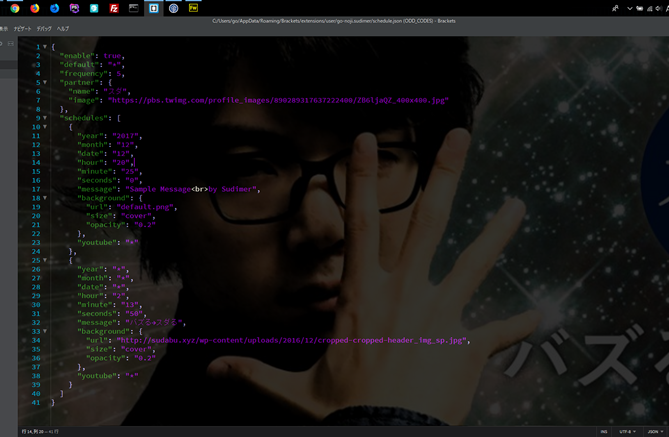
まあ背景をcover設定にしてこんな感じにすれば、Sdacketsっぽいのではないだろうか。やべぇ想像以上に作業はかどるわこの背景。
まとめ
というわけでスダAdvent Calendarの13日目記事、楽しんでいただけただろうか?
スダさんに限らず、あなたに喋りかけてくれるパートナーは好きな有名人でも、アニメのキャラクターでも、友達でもいい。ネットに上がっている画像かYoutube動画であればなんでもあなたのパートナーになりうるし、なんでも好きなセリフであなたを喜ばせてくれるだろう。
ちなみに今回の拡張機能のリポジトリはhttps://github.com/Go-Noji/Sudimerに上がっているので改造したり、自分でBracketsの拡張機能を作るときの雛形が欲しい、または突っ込みを入れたい方は利用してほしい。
最後になったが、Bracketsを開発してくれたAdobeと素晴らしい企画を立ててくれた中村 勇希さん、同じAdvent Calendarで楽しませてくれるクリエイターの皆さん、そしてなによりこの拡張機能を作るきっかけを与えてくれた須田 修伍さんに最大限の感謝をしつつ、この記事の結びとしたい。
皆の創作意欲を掻き立てるスダさんの未来に幸あれ。
Comments
-
Okay, 1winplinko is actually kind of addictive! Played for a bit last night and ended up having a surprisingly good run. Worth a look if you’re into that kind of game. Check out 1winplinko.
-
Just hopped into Sprunki – Feed Simon and the vibes are fire! No cap, the soundtrack is one of the best I’ve heard in a mod. GG to everyone involved!
-
The vibes in Sprunki – Feed Simon are immaculate! The music is an absolute banger, and the gameplay feels so smooth. Can’t wait to see more from this creator!
-
Just started playing Sprunki – Feed Simon and I’m already noticing some cool mechanics. Anyone else having trouble with the timing windows? Still, the core gameplay vibes are solid.
-
Solid analysis – key to consistent wins! Seeing platforms like JKBoss streamline access to games & logins is a huge plus for serious players. Check out their jkbose login for a seamless experience – convenience matters! Good read overall.
-
Heard some whispers about 777cb. Anyone tried it out? I’m looking for a new place to chill and spin. Seems promising. 777cb
-
Struggling with 7betlogin! Trying to remember my password is a nightmare. Once I’m in tho… hopefully luck is on my side! 7betlogin
-
Hey anybody use apostou bet? Thinking about putting a little somethin’ somethin’ down on the game tonight. What are the odds looking like? apostou bet
-
luk888… Sounds familiar! If you’re after a place to wager and win, this is definitely one to bookmark. Always something exciting happening there! Learn more by luk888
-
No joke, ket qua.net 9 is where I get my fix. Quick, simple, and exactly what I need. Get yours here: ket qua.net 9
-
Frivi games rock! 7friv.com seems to have all of them. Tried it and have all day playing. What are you waiting to join the experience of frivi!
-
Excellent work on this Brackets extension! Editor customization directly impacts developer productivity, and your scheduling approach is genuinely innovative. The way you’ve integrated timed reminders creates a more personalized workflow. For seamless user experiences across platforms, check how jljl33 download optimizes accessibility. Keep building
-
Bet888vina nhà cái cá cược thể thao và casino online hàng đầu. Nhiều khuyến mãi hấp dẫn cho người chơi mới. Tham gia ngay tại bet888vina để nhận ưu đãi!
-
Looking for a reliable bong88 agent? These guys seem legit. Quick responses and helpful. Give them a shout out bong88 agent.
-
88vinvt, not my favorite but sometimes gives you a win more likely than other sites. You can try 88vinvt. GLHF!
-
Just killed this meeting with some data! The return rate analysis on kkkphlegit casino looks solid for PH players. Secure, legit, and culturally relevant slots finally give me a reason to stop scrolling and actually play responsibly without feeling guilty about the math behind the fun.
-
This is a fantastic example of how deep technical customization enhances the developer experience. Thinking about ‘Sudimer’ as a workflow enhancer reminds me that sticky engagement-whether in code or in community fun-requires scheduled, rewarding interaction. It’s the core principle of building a dedicated user base, much like the features found at the perya plus club. Great work!
Warning: Undefined variable $aria_req in /var/www/html/noji.dev/wp-content/themes/ODD_CODES/comments.php on line 15
Warning: Undefined variable $aria_req in /var/www/html/noji.dev/wp-content/themes/ODD_CODES/comments.php on line 17
Playing io, my dudes! Heard good things and gave it a shot. So far, so good. Give it a whirl! Check it out: playing io